Top up in a flash by installing Nexone on your device

HOW TO TOP-UP MOBILE LEGENDS DIAMONDS ON NEXONE PH
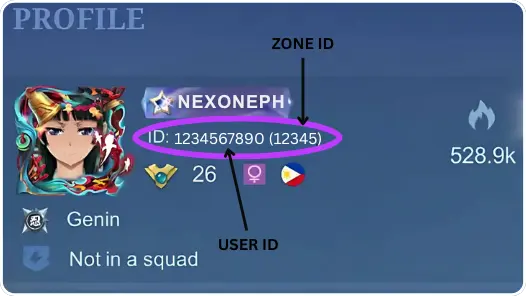
1. Enter your Mobile Legends User ID and Zone ID,
Example: 123456789 (1234)
2. Select the Diamond amount you want to purchase.
3. Complete payment using any PH e-wallet or bank.
4. Diamonds are delivered to your MLBB account once payment is confirmed.
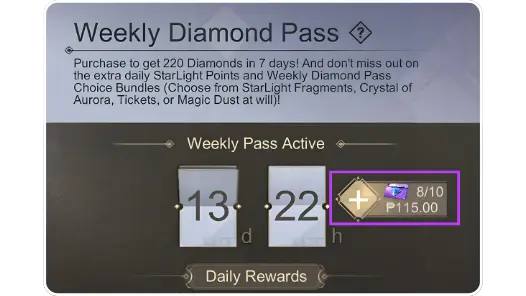
⚠️ REMINDER:
Always check your Weekly Diamond Pass limit before buying to avoid delays or failed transactions.
from 2,316 reviews
09 Jan 2026, 15:41
"I've topped up here multiple times, it's safe and no phishing."
09 Jan 2026, 13:34
"It was credited instantly, safe and trusted."
09 Jan 2026, 13:28
"The prices here are much cheaper compared to other places."
09 Jan 2026, 13:27
"It was credited instantly, safe and trusted."
09 Jan 2026, 13:21
"It was credited instantly, safe and trusted."





Required: You must enter email to receive a transaction receipt
Enter your User ID and Zone ID in the fields provided, select the number of Diamonds, and then complete the payment. The Diamonds will be automatically credited to your account.
Open your profile in Mobile Legends. Your player ID is displayed below your name, for example: 12345678 (1234). The number before the brackets is your User ID, and the number in the brackets is your Zone ID.
It usually takes a few seconds to five minutes after a successful payment. If it takes longer, please contact our customer service.

mobile legends ph top up, buy mobile legends diamonds ph, ml ph diamonds recharge, mobile legends philippines top up, ml ph nexone